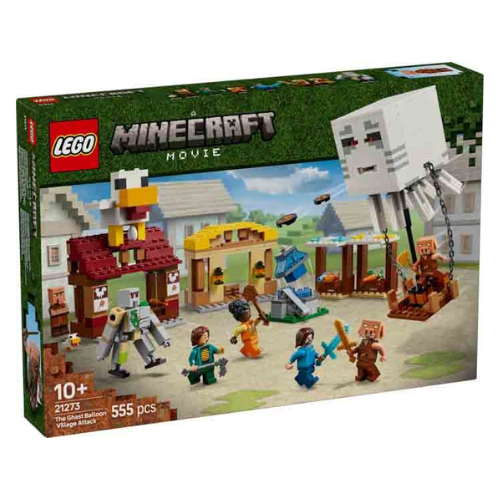
The Ghast Balloon Village Attack (21273) is a video game building set based on a scene from the Minecraft® movie. This high-quality LEGO® Minecraft toy for kids features explosive action when an attack is launched from a balloon, making this video game LEGO set a great gift idea for boys and girls aged 10 and over.
The set features popular characters from the video game: Steve, Natalie, Dawn, 2 piglins, a ghast balloon, villager, baby chicken and a posable iron golem figure. The balloon has room for the piglins and incorporates a disc shooter. Set amongst the village are market stalls, Steve's fried chicken restaurant, his crafting shack and a fountain, which kids can 'explode' using a built-in feature. The restaurant's roof is topped with a large chicken model that includes a fun egg-laying function. For digital fun, the LEGO Builder app lets kids zoom in, rotate models in 3D and track their progress.
LEGO® Minecraft® gamer gift - The Ghast Balloon Village Attack toy for kids is a creative build-and-play set for boys and girls aged 10 and over that recreates a scene from the Minecraft movie
Minecraft® toy figures - This hands-on video game set includes Steve, Natalie, Dawn and a villager minifigures, plus a ghast balloon, baby chicken, 2 piglins and a posable iron golem figure
Video game LEGO® set - When piglins launch missiles from their ghast balloon, causing the fountain to 'explode', kids must defend the villagers and Steve's fried chicken restaurant and crafting shack
Interactive toy - The roof of the restaurant features a large chicken model, which includes a fun egg-laying function
Gamer gift for kids - This high-quality buildable toy for boys and girls aged 10 and over is a great gift idea for fans of the Minecraft® movie
3D building instructions - Kids can download the LEGO® Builder app for an immersive building experience, with digital tools to zoom in and rotate models in 3D, save sets and track progress
Minecraft® made real - LEGO® Minecraft building toys for kids give players a different way to enjoy the game, with mobs, scenes and features brought to life with the hands-on creativity of LEGO bricks
555-piece set - This versatile playset includes a ghast balloon measuring over 18 cm (5 in.) high